![green house sales and marketing.png]](https://kb.greenhouseuvu.com/hs-fs/hubfs/green%20house%20sales%20and%20marketing.png?height=35&name=green%20house%20sales%20and%20marketing.png)
1. Inside the client's website development folder, right click in a blank space. Hover over the arrow next to Google Sheets, and select "From a template".
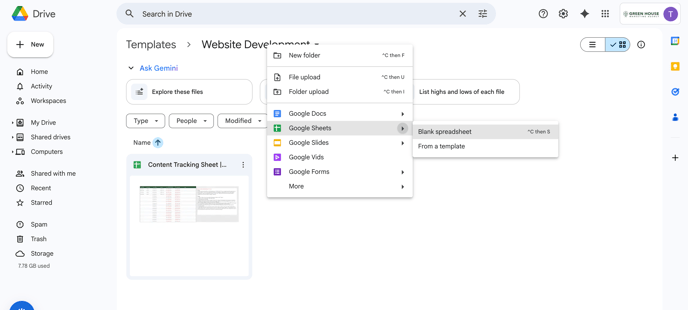 2. Locate the "Content Tracking Sheet | [Client Name]" template and select it. It will make a copy for you.
3. Fill out the information as guided in the template.
Instructions found inside the template are also included here:
DELETE THIS BOX BEFORE SENDING TO CLIENT
Goal:
Use the tracking sheet like a mini Monday.com for the client. Focus on approving the page structure with the client - this is most important. Wording can always be adjusted later. If the client doesn't care/doesn't review and approve content on their own, make sure to review the page structure together during one of their bi-weekly meetings.
Steps:
1. Create a folder in the client website development folder called “Pages” to have team members put their documents.
3. Add page titles to the table
4. Assign members of your team to pages. Tip: Assign similar pages to the same team member for consistency. Example: One person writes 5 service pages. That way, all the service pages follow a similar flow. Page consistency makes it easier to build the site in Elementor.
5. Fill in the table as the team creates content. Tip: I reccommend that you write the content FIRST and then go back and optimize it. Use AI as a TOOL, do not just copy and paste without reading through it.
6. Go back and optimize each page for SEO. Write meta titles, descriptions, slugs, and choose 1 primary keyword per page.
7. Delete this instruction box and send to client to review. (You can send it to the client before optimization is finished.) Note: the client might be too busy to look too closely at the content before it is implemented on the website and that is OK. Just make sure that we know what we want to talk about on these pages. How we say it can be changed later. We just need to know how to structure the pages.